
Stop paying for returns you could have prevented
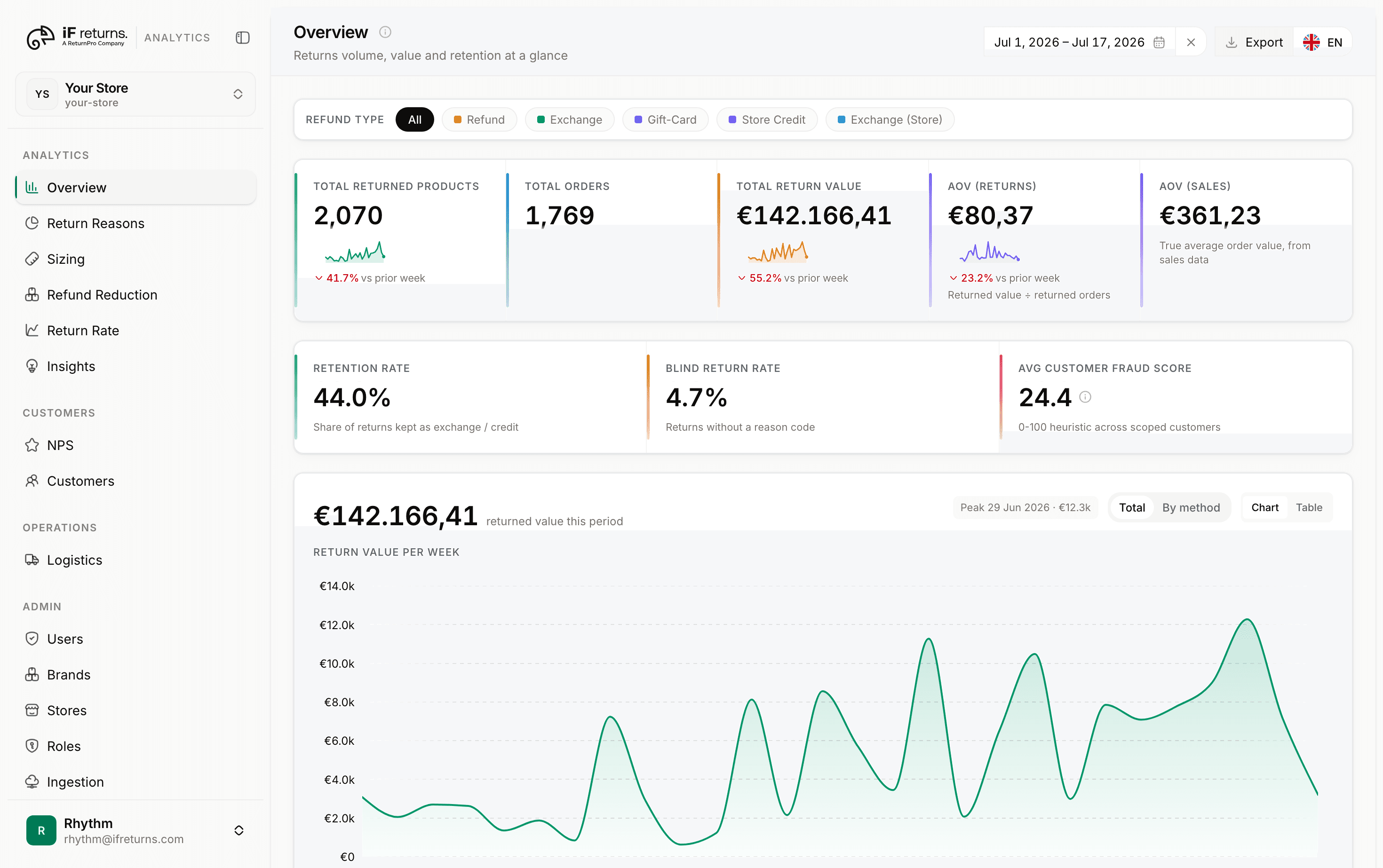
Your iF Returns portal already knows what came back and why. Your store knows what sold. iF Returns Insights Engine puts the two together, so you can see return rate, reason mix and how much revenue you keep, product by product.
Brands already running their returns with iF Returns.




EVERYTHING YOUR RETURNS DATA CAN TELL YOU
What each page in the dashboard answers
Returns come from your iF Returns portal, orders and products from your store. Each page turns that into one decision you can make this week.
Wrong size
Jun 3, 2026 · Exchange
Changed mind
May 21, 2026 · Store credit
Damaged in transit
Apr 30, 2026 · Cash refund
Not as described
Apr 12, 2026 · Store credit
Late delivery
Mar 28, 2026 · Gift card
Refund matched
Store credit applied to the order automatically.
Refund alert
Store credit now covers 41% of refunds this week.
Refund
See how much revenue you keep against how much walks out as cash, and where exchanges and store credit are winning it back.
See Refund in your dashboardLogistics alert
Average days to refund is above SLA for one carrier.
Logistics
How long a return really takes, from the customer handing it over to the refund landing, split by carrier, country and service type.
See Logistics in your dashboardRMA-4821
Return Reasons
Volume tells you how much came back. The reason mix tells you why, down to the products your customers keep telling you run small, and which reason is quietly taking the biggest bite out of revenue.
See Return Reasons in your dashboard

2,480 orders synced
312 returns synced
Return Rate
Units sold in Shopify against units returned, product by product, with an alert on anything that climbs past your own threshold.
See Return Rate in your dashboardMULTI-STORE VISIBILITY
See every store. From one dashboard.
Every connected store rolls up into one view, with return rate, retention and NPS sitting next to each other. Compare your stores instead of opening them one at a time and holding the numbers in your head.
Return rate, retention and NPS in one view
Brand-level and store-level views, side by side
Benchmarks set per store, not one blended number
Export any view as a PDF report
Weekly report highlights
Live store benchmarks
Return rate
8.4% vs 9% target
Retention rate
61% kept as credit
Portal NPS
7.6 vs 8.0 target
Retention rate
64%
Benchmark
60%
target
Retention rate
107% of benchmark
4 points above benchmark
Apply the recommendation
BRANDS AND STORES
Grant access once. It follows the brand.
Give someone access at brand level and they get every store in it, including the ones you add next month. Roles stack, and a per-store override can force allow or deny when one store needs to be different.
One brand, many stores, one access grant
New stores inherit brand access automatically
Per-store overrides force allow or deny
Seats and roles managed from Admin
AI ACCESS
Ask your assistant.
It only sees what you allow.
Put the question to Claude, ChatGPT or Gemini and get the answer off your own numbers. Read-only tools, scoped to your stores by OAuth, revocable whenever you want, with customer emails masked to the domain before an assistant ever sees them.
Read-only MCP tools, scoped to your stores
Works from Claude, ChatGPT, Gemini and any other MCP client
Revoke an assistant's access at any time
Customer emails masked to the domain
iF Returns Insights Engine
Connected assistants
Claude, ChatGPT, Gemini and any other MCP client
Recent activity
Claude called get_returns_overview
Overview, last 30 days
ChatGPT called get_nps
Gemini called get_sizing
Microsoft Copilot called get_logistics
Claude called get_return_reasons
Reason mix by category
ChatGPT called get_refund_analysis
Revenue retention
INTEGRATIONS
Ask your returns data anything, from the assistant you already use
iF Returns Insights Engine runs its own MCP server. Any assistant that speaks MCP can read your numbers, so you ask in plain language and get the answer off your own data. No exports, no API keys, no copying figures into a spreadsheet first.
- Read-only tools, scoped by OAuth to the stores you can already see.
- Claude and ChatGPT connect by pasting one URL. Any other MCP client with OAuth support registers itself.
- Customer emails are masked to the domain before an assistant sees them.








TARGETS AND ALERTS
Set the numbers each store is held to
Return rate, retention, NPS, days to refund. You choose the target every store is measured against, and the dashboard tells you which stores are missing it.
What you control
The targets are yours, not our defaults
KPI targets, alert thresholds, SLA stages and minimum sample sizes are all editable, and they are stored per store rather than blended across the brand. Our defaults are a starting point you can overwrite on day one.
Alerts fire on your number, not a generic one
A product is flagged when its return rate passes the threshold you set and the month carries enough units sold to mean anything. You get told about the misses instead of reading a feed of noise.
A miss is real before you hear about it
Thin data is held back rather than smoothed. Too few units sold raises no alert, a low-volume week leaves the sizing line, and a store with no sales feed drops out of the return-rate KPIs and gets named.
Assistant access is read-only OAuth, scoped to the stores you already see and revocable whenever you want. Customer emails are masked to the domain.
HOW IT WORKS
4 steps, and 3 of them run on their own
Connect a store once. Ingestion, benchmarking and alerts keep running after that.
Connect a store
Link a Shopify store. Your iF Returns portal is already the source of truth for its returns, so there is nothing to migrate.
Matched and scored overnight
Every return is matched to its order, then scored for risk and customer value, along with every figure behind the KPIs.
Benchmarks and alerts
Retention, NPS, days to refund and the SLA per journey stage each get a per-store benchmark. Miss one and it becomes an alert with a recommendation.
Export the report
Pull the report to PDF whenever you need it, for one store or every store you have access to.
Find out what your returns cost you last month
Your iF Returns portal and your store are already connected, so there is nothing to set up. Log in and see return rate, reason mix and the revenue you kept, for every store.